Brilliant Egyptian Boy Explains Whats Happening in His Country

If you ever doubted that knowledge is power and that knowledge can make a difference listen to this kid. And pick up a newspaper or read, and as this kids wisely says “Use your own brain”. STR

On the heels of Egyptian President Mohamed Morsi’s removal from power on Wednesday, oneYouTube video has been getting a lot of traction.

Filmed in Cairo on Oct. 19, 2012, the clip features 12-year-old Ali Ahmed participating in a video interview with Egyptian news outlet El Wady. The boy, who is in the first grade of preparatory school in Egypt (equivalent roughly to the sixth or seventh grade in the U.S.), excoriates the Muslim Brotherhood and details his thoughts on issues ranging from gender inequality to the political process and Parliament to the economy.

“We didn’t get rid of a military regime to replace it with a fascist theocracy,” he says in the video. “The social objectives of the revolution are yet to be achieved — economic empowerment, freedom and social justice — there are still no jobs, the police still jail people randomly. As for social justice, how can a news anchor get 30 million Egyptian pounds while some people still pick food from garbage?”

Ahmed calls the political process of his country void, noting problematic examples such as mosques mobilizing voters and parties basing their campaigns on a mixture of religion and politics. When the interviewing reporter (off-camera) asks Ahmed where he bagged his political savvy, he says he just knows it; he reads newspapers, watches TV and searches on the Internet. He also uses his own brain, he says.

Although the footage is more than a half-year old, it recently found a surge on Reddit, where discussion abounded regarding the originality of the boy’s sentiments and the credibility of the translation.

Image courtesy of YouTube, FreeArabsChannel

via Brilliant Egyptian Boy Explains Whats Happening in His Country.

Posted in Interesting, Know your Rights, [ STR ] | 2 Comments

Top iOS apps and games go free ahead of App Stores fifth anniversary | The Verge

A host of highly regarded apps for iPhone and iPad have gone free today in what could be a major celebration to mark five years since Apple launched the App Store. So far, games such as Infinity Blade II, Superbrothers: Sword and Sworcery EP, Wheres My Water?, Badland and Tiny Wings iPhone / iPad are all on offer for nothing, alongside apps such as the beautiful photo-annotating app Over, Traktor DJ iPhone / iPad, Day One, Over, How to Cook Everything, and Barefoot World Atlas.

None of these apps have ever been free on the App Store before, and many have commanded relatively high prices until now. In the case of Traktor DJ for iPad, the app normally sells for $19.99, and comes recommended by The Verges Nilay Patel and Trent Wolbe.Apple is yet to make any announcement regarding the offers, and none of the apps in question give any explanation on their store pages.

Since the App Store went live five years ago this week, the deals may be part of a coordinated celebration. The Verge has contacted Apple for more information on the matter.

via Top iOS apps and games go free ahead of App Stores fifth anniversary | The Verge.

Posted in Apple, Apps, Deals, Interesting, iOS, tips | 4 Comments

Five ‘Get Out of Your Own Way’ Leadership Skills from Aikido

Aikido as a martial art is also a good study of energy, yours and your opponent’s, and in a larger context can be applied to life and leadership. You may already be practising some of the skills mentioned in this article, a mental-physical practice like aikido can help you to finetune these skills further.

Think of what you bring to the mat at a dojo as a microscopic, intense study and fusion of your body, mind and spirit. These three elements should all be in tune as you move as ‘one’. Hence why aikido is often referred to as a ‘moving meditation’. You can practise the same in your leadership style.

via Five ‘Get Out of Your Own Way’ Leadership Skills from Aikido.

Posted in Interesting | Leave a comment

Six of the Most Common Resume Flaws (and How to Fix Them)

When job hunting, your résumé has a way of highlighting little career imperfections in black and white. Maybe you’ve job-hopped, had a long gap between gigs, or earned a degree that requires explaining (hello, art history majors!). Is there a way to smooth over these résumé imperfections—without being dishonest? You betcha.

You just have to get creative, be upfront, and do a little rebranding. We spoke with job coaches, recruiters, and candidates who have been in your shoes to find out how best to fix six of the most common résumé flaws.

via Six of the Most Common Resume Flaws (and How to Fix Them).

Leave a comment

Use Multiple Large Words as Passwords to Boost Spelling and Security

Two of the biggest problems with passwords is how hard it is to make a secure one and how difficult those are to remember. Solve both problems by using an assortment of vocabulary words to learn.

We’ve always argued that the most secure password is one you don’t even know, and is basically incomprehensible. Security expert Thomas… Read…

As we (and xkcd) have discussed before, longer, multi-word passwords are harder to crack than short ones with a bunch of random characters in them. Since you’re already in the neighborhood, you may as well exercise your spelling skills at the same time by choosing some miscellaneous hard-to-spell words. This way, you’ll get in the rhythm of typing them correctly. If you’re looking for a few, here’s one of the many lists of commonly misspelled words the internet has to offer.

Of course, the one downside to this is that some places have character limits for passwords or even require short lengths and extra characters. In many cases there’s nothing you can do about that, though an email to the company asking for more complex password options couldn’t hurt.

via Use Multiple Large Words as Passwords to Boost Spelling and Security.

Posted in Hacking, HowTo, Interesting, MSFT, tips, WIN8 | Leave a comment

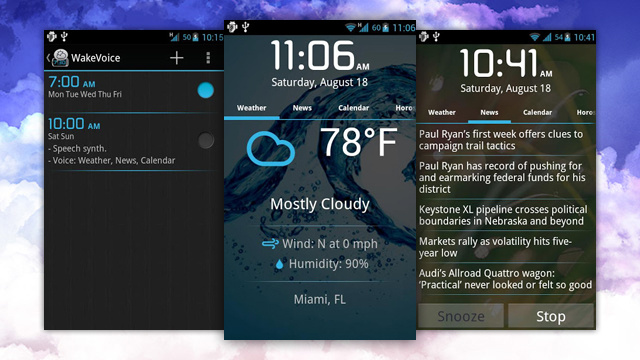
WakeVoice Is an Alarm Clock That Talks To You (and You Can Talk To)

WakeVoice is different. Instead of waking up to music, WakeVoice rings, then speaks to you when it’s time to get up. It can play a personalized message, read the news headlines, or fill you in on the weather for the day, all while you drag yourself out of bed.

It’s all too tempting to hit the snooze button when the alarm goes off in the morning. Don’t do it: You might think the extra few minutes… Read…

WakeVoice isn’t new by any means—it’s been around for a while, but we just haven’t mentioned it. When WakeVoice goes off in the morning, you can speak to it to snooze or turn the alarm off, or you can pick up your phone and turn it off manually. If you tell it to snooze, you can go back to sleep before it rings again (but we all know you shouldn’t use the snooze button). If you tell it to stop, the voice you’ve selected will take over and tell you what you want to hear, whether it’s a little inspirational message to get your day started right, the latest news, or the weather so you know how to dress when you get out of bed.

via WakeVoice Is an Alarm Clock That Talks To You (and You Can Talk To).

Posted in Android, Apps | Leave a comment

Frozen Soda Treat

Leave a comment

Zeus Trojan returns: Facebook being used to spread the infection – TechSpot

The infamous Zeus malware has once again resurfaced, but this time it’s using Facebook to further its crime spree. First detected in 2007, Zeus has infected millions of computers over the past six years. Despite the efforts of numerous security firms to combat the Trojan horse, it has only gotten stronger with age.Following the initial infection, the virus lays dormant until an online banking site is opened. It then uses keyloggers to steal the unsuspecting victim’s usernames and passwords. Sometimes the Zeus malware goes even further – it replicates the banks website, using a fake interface to obtain social security numbers, credit card digits, and other sensitive information. Eurograbber, a Trojan that employs similar methods to that of Zeus, reportedly stole $46.5 miillion from European users.It is for this reason that Zeus is so effective. Even when your bank account is fully drained, the malware continues to search for any tidbits of data that can be sold on the black market. And unlike most malicious software, there are little to no warning signs – the computer will continue to operate normally, as an outright crash was never the intent.Eric Feinberg, the founder of Fans Against Kounterfeit Enterprise FAKE, believes that bogus Facebook pages are now being used to spread the malware. One such page was called “Bring the N.F.L to Los Angeles.” After asking a security team to analyze the shady links that were posted throughout the group, Feinbergs theories were proven to be correct.The big concern is how little Facebook is doing to combat the threat. In response to Feinberg’s outreach to the social media giant, Facebook suggested that users should take matters into their own hands by signing up for scanners that can identify and remove the Trojan. According to The New York Times, Feinberg added, “They’re not listening. We need oversight on this.”

via Zeus Trojan returns: Facebook being used to spread the infection – TechSpot.

Posted in Virus/Malware | Leave a comment

Leaked Windows 8.1 build points to the Start buttons return

When we last got a peek at Windows 8.1 “Blue,” most of the updates lurked under the surface: rumors of a Start button revival didnt pan out. Flash forward to Paul Thurrotts screenshots of a newer build, however, and its a different story. The leaked code has the Start button once more occupying a spot on the desktop taskbar, with behavior reportedly like what weve seen with Stardocks Start 8 utility. More throwbacks also appear to be in store. Users can now transfer their desktop wallpaper to the Start screen, and the storied boot-to-desktop option is available — if turned off by default. Microsoft hasnt acknowledged the existence of these or any Windows 8.1 features, but the rapidly approaching Build conference suggests that well learn more in the near future.

via Leaked Windows 8.1 build points to the Start buttons return.

Posted in Interesting, MSFT, Rumor, Tech, WIN8 | Leave a comment

Choose your color | Memoto – automatic lifelogging camera

The Memoto Lifelogging Camera is the smallest wearable camera with a GPS. It is easy to clip on to your clothes and it will automatically start capture moments from your life. The camera has no buttons that´s right, no buttons .

The camera and the app work together to give you pictures of every single moment of your life, complete with information on when you took it and where you were. This means that you can revisit any moment of your past.

via Choose your color | Memoto – automatic lifelogging camera.

Leave a comment